Free Download for Android

View an ad to download for free

Xavier Slim

Updated last week

A software to manage devices remotely

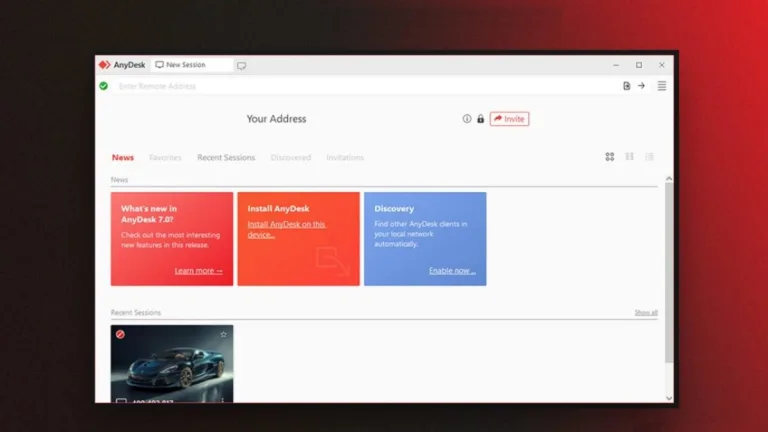
AnyDesk Remote Control is a free and subscription-based development and IT application from AnyDesk Software GmbH. This advanced remote control solution allows users to access, control, and manage remote computers from any location and over any network. It enables a secure, remote connection and provides a variety of features such as file transfer, session recording, remote printing, and more.

Top Recommended Alternative

Like TeamViewer and Chrome Remote Desktop, AnyDesk Remote Control boasts cross-platform compatibility and simplifies access to remote devices, including computers, tablets, and mobile phones anywhere, at any time. Its navigation system is straightforward, allowing users to access its features with ease.

Flexible, efficient, and secure

AnyDesk Remote Control is a dependable and secure remote control management software, as it employs sophisticated encryption protocols ensuring the safe transmission of data. The software is an excellent choice for personal and professional use, offering flexibility and convenience by accommodating a broad spectrum of operating systems. Additionally, it provides comprehensive features for practical applications, such as file transfer, remote printing, wake-on-LAN, and more.

This software is an efficient tool to perform collaborative projects and eliminates physical barriers in businesses, educational institutions, and other related contexts. Besides providing remote access, it enables teleconferencing, simultaneous audio and video streaming, and other system administration functions. Using the cloud system, the tool can be scaled up or down so that you can easily access your computer from any device, regardless of its size and capacity.

Users have the option to choose a plan that best meets their needs. The application has a free version designed for single, personal use. It also offers three premium plans that provide varying numbers of licensed users. Its most comprehensive subscription plan provides 50 licensed users and up to 1,000 managed devices. However, the potential for misuse of its features may allow for unauthorized access to confidential data.

Connecting users and information with ease

Overall, AnyDesk Remote Control is a helpful tool for remotely accessing and managing devices. It is, especially, helpful for IT professionals to conveniently access remote devices to provide support, troubleshoot issues, distribute software, manage settings and configurations, and monitor system health from anywhere. It also facilitates communication between colleagues to promote teamwork and streamline operations. Consequently, it offers greater convenience and productivity in tackling various tasks. 
Xavier Slim

Xavier Slim has experience in English writing supported by academic recognition and creative competitions. He has worked on tutoring and editorial projects, developing content that balances clarity with creativity. His interests in writing and technology inform his practical approach to reviewing digital tools.

  • Pros

    • Cross-platform compatibility
    • Secure encryption for data safety
    • User-friendly design
    • Easy file transferring, remote printing, teleconferencing, and more
  • Cons

    • Possibility of misusing the software for fraudulent purposes
 0/5

App specs

  • Developer

  • License

    Free

  • Version

    9.0.2
  • Latest update

  • Platform

    Android

    Other platforms (4)
  • OS

    Android 17.0

  • Language

    English

    Available languages

    • English
    • German
    • Russian
    • Finnish
    • French
    • Chinese
    • Swedish
    • Greek
    • Italian
    • Spanish
    • Czech
    • Japanese
    • Polish
    • Danish
    • Turkish
    • Korean
    • Chinese
    • Portuguese
    • Norwegian
    • Dutch
  • Downloads

    130.4K

    Last month's downloads

    • 2.4K
  • Size

    38.58 MB

  • Download Options

    APK, Google Play

  • Filename

    com.anydesk.anydeskandroid_9.0.2.xapk

Also available in other platforms

Program available in other languages


Free Download for Android

View an ad to download for free


User reviews about AnyDesk Remote Control

Have you tried AnyDesk Remote Control? Be the first to leave your opinion!

Add review

You may also like

Alternatives to AnyDesk Remote Control

Explore Apps

Related Articles

Latest articles

Laws concerning the use of this software vary from country to country. We do not encourage or condone the use of this program if it is in violation of these laws.
Softonic

Is AnyDesk Remote Control safe?

100/100

Score result: Clean

This file passed a comprehensive security scan using VirusTotal technology. It is safe to download.

  • Virus free
  • Spyware free
  • Malware free
  • Verified by Security Partners

    VirusTotal logo

Scan Info

Last scan
Wednesday, October 28, 2026
Scan provider
VirusTotal · Full report

File Integrity

File
com.anydesk.anydeskandroid_9.0.2.xapk
SHA256
ce0f32d0ca9869a230fcfccef8103dbb4e5bcbbc86adb3aaf0b449aae64e5303
SHA1
464e5bdd3a7fb4ca6a8583d0fd12196e09a8de82

Softonic security commitment

AnyDesk Remote Control has been thoroughly scanned by our advanced security systems and verified by industry-leading partners. This file comes from the official developer and has passed all our security checks, showing no signs of viruses, malware, or spyware. For more information, visit our Security and Trust Center

Signed in to Softonic as